

Snowmint Creative Solutions LLC
Budget Touch application icon Budget Touch

App Store logo
iPhone icon
Overview Screenshots Documentation Release
Notes
FAQ

Keep your budget on an iPhone, iPod Touch or iPad

Tired of living paycheck to paycheck? Can't get out of debt? Try a better way to manage your money. Budget Touch is based on the tried and true envelope method of budgeting. It's an easy and effective way to see where your money is, where it's needed, and where it went.

Budget Touch is not just a simple expense tracker. By itself, it is a full featured budget app that allows you to work with both expenses and deposits on your iPhone or iPod Touch. Used with Budget on your desktop, it is an unbeatable combination to help you stay out of debt.

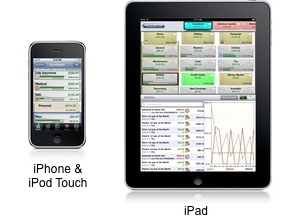
iPhone
iPhone account screen screenshot. iPhone envelopes screen screenshot. iPhone history screenshot.
iPad
iPhone account screen screenshot. iPhone envelopes screen screenshot. iPhone history screenshot.
Use Budget Touch on the go, then sync transactions with Budget
on your home computer

Sync requires Budget v6.3.2 for Mac or higher (v6.5 for best sync features); sync for Budget on Windows coming soon
Secure your financial data on your iPad, iPhone or iPod Touch!

Budget Touch encrypts all of your data with strong industry standard encryption. Set a password to secure your data from prying eyes.

Major Features

  • New! iPad User Interface: Dynamic and fluid UI designed specifically for the iPad.

  • New! Set Income and Expenses: Define Income and Expenses to automatically distribute your pays to your envelopes.

  • Complete Budget App: Based on the envelope method.

  • Simple Transaction Entry: A few touches and you're set.

  • 8 Transaction types: Single envelope or split them between envelopes.

  • Password and AES-128 encryption: Your data is secure!

  • Sync with Mac: Sync multiple devices (iPad and/or iPhone) with the desktop.

  • Reconcile Accounts: Quickly balance your bank accounts.

  • Unlimited: Create as many accounts, groups, envelopes and transactions as you need.

  • Icons: Customize accounts and envelopes.

  • History: See a record of your transactions.

  • Many More features: Graphs, Reports, etc.

Learn about Budget and the envelope method.

See the documentation in a new window.

 Contact Us   RSS Feeds   Privacy Policy